Wednesday, August 1, 2018

Difference between InMemory and TempDB tables in AX 2012

Basic differences between them are:

InMemory tablesTempDB tables
1. Holds data temporarily in client or server tier1. Holds data temporarily in database till the scope is valid
2. These tables can't be stored in Database2. These tables are stored in the database
3. Can't apply security3. Can apply security
4. We cannot use InMemory table buffers4. TempDB table buffer can be used in coding


TempDB tables

We call them TempDB tables because their TableType property value is TempDB. This value comes from the TableType::TempDB enum value. The TableType property value can be set at AOT > Data Dictionary > Tables > MyTempDBTable > Properties > TableType.
All types of temporary tables are automatically dropped by the system when the table variable in X++ goes out of scope. A TempDB table is NOT dropped when you set its record buffer variable to null.

Capabilities of TempDB Tables:

  • Can be joined with other AX tables
  • Can be either per company or global.
  • Can be used from Enterprise Portal by using .NET Business Connector.
  • Can have foreign key columns.(A TempDB table can have a foreign key column that references the primary key of another table. However, no table can have a foreign key column that references the primary key of a TempDB table.)
  • TempDB tables can be instantiated from the client or server tier.
  • Can have indexes columns.(A TempDB table can have indexes defined for it in the AOT.)
  • You can add methods to a TempDB table. However, you cannot override any methods that come with a new TempDB table.
  • Usable as a query(A query under AOT > Queries can reference a TempDB table as a data source.)
  • Transaction support. (The underlying database management system does provide transaction support for each instance of a TempDB table, just as it does for any regular table. Each instance is a separate table that is unrelated to the other instances, and each instance has a brief lifetime.)
  • No configuration key is required.
  • Limitations of TempDB Tables:
  • Cannot be a valid time state table.
  • Cannot have any delete actions.
  • No Record Level Security (RLS).
  • Cannot use the Table browser form.
  • Cannot be in a table collection.
  • No view support.

Lifetime of TempDB Tables:
A TempDB table is instantiated in the underlying database management system when the first SQL operation is sent to the database system from the AOS. (select, insert, update, or delete)

The situations that cause a TempDB table to be dropped are: 

  • Variable goes out of scope.
  • Controlled restart of the AOS.
  • Restart of the database system.
  • Closure of the AX32.exe client.
  • From Online Users form.

InMemory tables

The second type of temporary table is the InMemory table. We call them InMemory tables because their TableType property value is InMemory. This value comes from the TableType::InMemory enum value. The TableType property value can be seen at AOT > Data Dictionary > Tables > MyInMemoryTable > Properties > TableType.

Note: 
In Microsoft Dynamics AX 2009 and earlier versions, InMemory tables were called temporary tables. Now there are two kinds of temporary tables, namely InMemory tables and TempDB tables. To avoid confusion we do not use the phrase temporary tables to refer to just InMemory tables or to just TempDB tables.

Tier: InMemory tables are instantiated in the active memory of which ever tier the process is running on, either the client or the server tier. InMemory tables are never represented in the database management system.
An InMemory table is held in memory until its size reaches 128 KB. The dataset is then written to a disk file on the server tier. The disk file for an InMemory table has the naming convention $tmp<nnnnnnnn>.$$$.

Scope: An InMemory table is instantiated when the first record is inserted. The instantiated InMemory table continues to exist only while a record buffer variable that references the table exists. The memory or disk space for the InMemory table is de-allocated as soon as the record buffer goes out of scope.

Indexes: can be defined on an InMemory table just as you would a persisted table. If an InMemory table is created by copying a persisted table, the indexes are also copied to the InMemory table. Indexes are useful for quickly retrieving data from InMemory tables, especially if the InMemory table data is in a disk file.


InMemory Tables vs. Containers
Microsoft Dynamics AX supports a special data type called a container. This data type can be used just as you would use an InMemory table. For more information, see Containers.

Data in containers are stored and retrieved sequentially, but an InMemory table enables you to define indexes to speed up data retrieval. An index is of no benefit if you are working with only a few records. In such cases a container might involve less overhead and perform faster than an InMemory table.

Another important difference between InMemory tables and containers is how they are used in method calls. When you pass an InMemory table into a method call, it is passed by reference. Containers are passed by value. When a variable is passed by reference, only a pointer to the object is passed into the method. When a variable is passed by value, a new copy of the variable is passed into the method. If the computer has a limited amount of memory, it might start swapping memory to disk, slowing down application execution. When you pass a variable into a method, an InMemory table may provide better performance than a container.


Conclusion : If you have just a few kilobytes of data, InMemory tables holds them in RAM, which is extremely fast. But if you have more data, it gets written on disk, not to waste RAM. Disks are much slower than RAM, of course. But you still can have data directly on client or AOS, without having to go to database.
But TempDB can use the whole power of SQL Server, which may make a big difference if you're running queries on large sets of temporary data.


Monday, July 30, 2018

Collection classes


The X++ language syntax provides two compound types: arrays and containers.
They are useful for aggregating values of simpler types. However, you cannot store objects in arrays or containers. 

The Microsoft Dynamics AX collection classes have been designed for storing objects. The classes are implemented in C++ to achieve the maximum performance (they are system classes).

Collection classes were formerly called Foundation classes.

ClassDescriptionData typesAccess
ListValues stored sequentially with ability to add values at the beginning or end of the listAll values must be the same data typeUse ListIterator or ListEnumerator
SetValues stored non-sequentially. Duplicates are not added to the set.All values must be the same data typeUse SetIterator or SetEnumerator
MapValues stored by using a unique key.The key and the value need not be from the same data type.Use MapIterator or MapEnumerator
StructValues stored by using a unique string as a keyThe key must be a string. The values can be of any type.Provide the string key to the value method

List -----
  • A list stores objects of all the same type in a sequential order. 
  • The elements can be any type specified in the Types base enum. 
  • Elements may be added to the beginning or end of the list. 
Usefull list methods:
--------------------------------------------------------------------------------------
addEnd(_item) -- Adds _item to the end of the list
addStart(_item) -- Adds _item to the beginning of the list
appendList(_list) -- Adds elements _list to the end of current list
elements                 -- Returns the number of items in the list
getEnumerator -- Returns an enumerator for traversing the list

Example:
-----------------------------------------------------------------------------------------
public void listExample() {
    List listOne;
    List listTwo;
    List combinedList;
    ListEnumerator listEnumerator;
    SalesTable salesTable;

    // Initialize using Types enum
    listOne = new List(Types::String);

    // Initialize using extendedTypeId2Type which does not require
    // knowing the base type
    listTwo = new List(extendedTypeId2Type(extendedTypeNum(SalesId)));

    // Add a and b to list such that order is b,a
    listOne.addEnd("a");
    listOne.addStart("b");

    // Add an actual sales id and dummy sales id
    select firstOnly SalesId from salesTable;
    listTwo.addEnd(SalesTable.SalesId);
    listTwo.addEnd("Dummy_Sales_Id_12345");

    // Print first list
    listEnumerator = listOne.getEnumerator();
    info("List one");
    while (listEnumerator.moveNext()) {
        info(listEnumerator.current());
    }

    // Create a new list by combining lists
    combinedList = List::merge(listTwo, listOne);

    // Print combined list
    info("Combined");
    listEnumerator = combinedList.getEnumerator();
    while (listEnumerator.moveNext()) {
        info(listEnumerator.current());
    }
}
Output:
image001

Set :
----------------------------------------------------------------
A set is an unordered collection that contains elements of all the same type and is similar to a mathematical set in that each element must be unique. 
Again, the types are all the possible types of the Types base enum. 
Repeated inserts of a value that is already in the set will have no effect. 
There will be no record of how many such inserts of a duplicate value occurred. 
For example, if a set of Types::Integer contains only the integer 2, repeated calls to the add method with 2 as a parameter will have no effect. No matter how many such calls are made, the set will still only contain the integer 2. 
One possible use of a set is to store RecIds to ignore any duplicate records and insure a process only acts once per record.
Unlike a list, an element can be removed from a set directly without using an iterator. There are also powerful methods that mimic mathematical set operations that allow creation of new sets based on two existing methods. 
Set Methods:
-----------------------------------------------------------------------------
add(_item)                           --------Adds _item to the set
delete(_item)                    --------Removes the passed in item to the set
elements                          ---------Returns the number of items in the set
getEnumerator                 ----------Returns an enumerator for traversing the set
in(_item)                         ----------Returns true if _item is present in the set
difference(_set1, _set2) ----------Returns items that are in _set1 but are not in _set2
intersection(_set1, _set2) ----------Returns a new set that contains only elements present in both _set1 and _set2
union(_set1, _set2)        ----------Returns a new set that contains all the elements of _set1 and _set2.
Example:
------------------------------------------------------------------------------------------------------
public void setExample() {
    Set setOne;
    Set setTwo;

    // Inner method for printing sets
    void printSet(Set _set, str _prefix) {
        int i;
        SetEnumerator setEnumerator;
        str output = _prefix;

        setEnumerator = _set.getEnumerator();

        // Add each element to output string 
        while (setEnumerator.moveNext()) {
            output += strfmt(" %1", setEnumerator.current());
        }
        info(output);
    }

    // Declare sets
    setOne = new Set(Types::String);
    setTwo = new Set(Types::String);

    // Fill sets
    setOne.add("A");
    setOne.add("B");
    setTwo.add("B");
    setTwo.add("C");

    // Size of set
    info(strfmt("Size of set one: %1", setOne.elements()));

    // Print sets and the results of set operations
    printSet(setOne, "Set 1");
    printSet(setTwo, "Set 2");
    printSet(Set::difference(setOne, setTwo), "Difference ");
    printSet(Set::intersection(setOne, setTwo), "Intersection ");
    printSet(Set::union(setOne, setTwo), "Union");
}
Output:
---------------------------------------------------------------------------
image003

Map

A map stores key-value pairs. For each key, there is a corresponding value.
Accessing the corresponding value of a key is a fast operation. 
The keys are unique and are all of the same type. The values do not have to be unique and also are all the same type. As with the other collection classes, the possible types are those specified by the Types base enum. Note that the key types and value types do not need to be the same and typically are not.
Some examples of maps are keys that are RecIds or strings that correspond to a numeric value. Another example is mapping RecIds from one table to a Record of another table, thus quickly and easily creating a fast performing link between two tables without having to use a temp table. The diagram below shows a map with Int64 keys mapping to reals.
image004
Useful map methods are summarized in the table below:
delete(_key)Deletes _key (and thereby its corresponding value) from the map
elementsReturns the number of key-value pairs in the map.
exists(_key)Returns true if _key is present in the map.
insert(_key, _value)Inserts the key value pair with a key of _key and a corresponding value of _value. In other words, lookups for _key will return _value.If _key already existed in the map, the corresponding value of that key is overwritten such that the new mapped value is _value.
lookup(_key)Returns the corresponding value of _key.
One important note is that calling the lookup method for a key that does not exist in the map will cause a runtime error. Therefore, the exists method should always be called first to verify that the key exists.
The MapEnumerator class traverses a map. The key and value are retrieved from the enumerator using the currentKey and currentValue methods.
The code below shows examples of several of the map methods including using an enumerator:
public void mapExample() {
    Map theMap;
    MapEnumerator mapEnumerator;
    real value;

    // Declare map
    theMap = new Map(Types::String, Types::Real);

    // Insert values into the map
    theMap.insert("LOT-01", 42.5);
    theMap.insert("LOT-02", 58.3);

    // Insert new value for LOT-01.  Previous value overwritten.
    theMap.insert("LOT-01", 99.9);

    // Traverse the map
    mapEnumerator = theMap.getEnumerator();
    while (mapEnumerator.moveNext()) {
        info(strfmt("key %1 value %2",
            mapEnumerator.currentKey(),
            mapEnumerator.currentValue()));
    }

    // Check if key exists
    info(strfmt("Does LOT-01 exist? %1", theMap.exists("LOT-01")));

    info("Checking if LOT-03 exists");
    if (theMap.exists("LOT-03")) {
        // Will not execute this code, so there is no error
        value = theMap.lookup("LOT-03");
    }

    // Will cause run time error: Lookup a key that is not in the map without 
    // first calling exists
    value = theMap.lookup("LOT-03");

    value = 1;
}
The code above produces the following output:
image005

Struct

struct groups information into a single entity. Any of the types of the Types enum can be stored which includes containers, dates, Int64’s, integers, objects, real numbers, records, strings, times, and UTCDateTimes. The diagram of the struct named “custInfo” shows an example struct that collects a string, real number, record, and object into a single entity.
Capture
The struct class is one of the simplest collection classes. Using a struct is similar to using a container that has a small number of values at fixed positions (such as the TradeTotals class). One major difference is that a struct is a class while a container is a built-in data type. A struct uses string indexes whereas a container uses numeric indexes. One of the problems with both is that the indexes or keys need to be managed entirely by the developer. For example, in the struct illustrated above, the value “43.58” needs to be accessed by providing the string “invoiced” exactly. Using the string “invoice” will cause a run time error because no value exists for the key “invoice”. For both structs and containers, one way to manage this issue is to access the keys/indexes using #define or methods.
The code below uses a constant for the invoiced but not the other keys. The code shows how to create and fill the struct illustrated above as well as how to iterate through a struct.
public void structExample() {#
    define.invoiced('invoiced')

    Struct theStruct;
    SalesTable salesTable;
    int i;

    // Create struct
    theStruct = new Struct(
        Types::String, "name",
        Types::Real, #invoiced,
        Types::Record, "order");

    // Fill struct
    theStruct.value("name", "John Smith");
    theStruct.value(#invoiced, 43.58);
    select firstOnly salesTable;
    theStruct.value("order", salesTable);

    // Add a new entry into the struct
    theStruct.add("orderType", SalesTableType::construct(theStruct.value("order")));

    // Print struct information
    info(strFmt("Definition string: %1", theStruct.definitionString()));
    for (i = 1; i <= theStruct.fields(); i++) {
        info(strFmt("Field name: %1 Type: %2",
            theStruct.fieldType(i),
            theStruct.fieldName(i)));
    }

    // Using exists for a key
    info(strFmt("Exists for key 'xyz'? %1", theStruct.exists("xyz")));
}
Below is the output produced by the above code:
image007
The sections below outline aspects of collection classes that may apply to more than one collection class.

Iterators vs. Enumerators

Enumerators should always be used to traverse a list, set, or map unless elements need to be deleted. Iterators can fail if they are used on a different tier than the tier where they were created. For example, code will fail if an iterator was created on the client side, but then runs on the server side or vice versa. Also, loop maintenance is easier when using an enumerator since there is no need to advance the iterator as a separate step.
while(iterator.more())     while (enumerator.moveNext())
{                          {
 iterator.next();   }
}
If the client/server problem can be safely avoided, then iterators can be used for deletion. However, there are alternative solutions (potentially expensive) to deleting elements from a collection without using an iterator. For a set, one possibility is putting elements to delete in a second set during traversal and calling the static intersection method. For a map, one could put keys to be deleted in a set, then traverse the set, deleting each key individually.

Pack and Create

All the collection classes mentioned above can be packed into a container using the pack method. A new instance of these classes can then be created using the appropriate static create method.
public void packCreateExample() {
    List aList = new List(Types::Real);
    List aNewList;
    container c;

    // Fill list
    aList.addEnd(1.61803);
    aList.addEnd(3.14159);

    // Pack the list into a container
    c = aList.pack();

    // Create a new list from the packed list
    aNewList = List::create(c);
}

Uniqueness of Tables and Classes

Special care should be taken if tables or classes need to be unique within the collection classes. This includes elements in a set or keys of a map. If you use a table as a unique key to a map, it seems that RecId is not the field used to determine uniqueness. Instead, non-system fields are checked. One way to bypass this is to add a GUID field to the table (thanks to Justin Wong for pointing this out). For classes it seems that even if two objects have the same values for variables, the objects will be determined to be unique by the collection classes.

Sorting Behavior of Sets and Maps

No matter what order elements are added to a set or keys are added to a map, when using an enumerator to traverse the set or map, the elements are in a sorted order (for string and numeric types). However, the MSDN documentation for the set class states that elements are stored in a set “in a way that facilitates efficient lookup of the elements.” It might not be safe, therefore, to rely on this sorting behavior as it might possibly change in the future.
The code below shows the sorting behavior in a set of reals:
public void setSortingExample() {
    Set set = new Set(Types::Real);
    SetEnumerator setEnumerator;

    set.add(2.3);
    set.add(3.8);
    set.add(1.2);

    setEnumerator = set.getEnumerator();
    while (setEnumerator.moveNext()) {
        info(setEnumerator.current());
    }
}
The result of this code is shown below:
image008

How to deploy custom code on D365 ?

Overview of the process 


In order to deploy your code and customizations to a runtime environment (Demo, Sandbox or Production), you must create deployable packages of your solution or implementation. Deployable packages can be created using the Visual Studio dev tools, or by the build automation process that are available on build environments. These deployable packages are referred to as Application Deployable Packages or AOT Deployable Packages. The image below is an overview of the process. Once a deployable package is created, it must be uploaded to the LCS project's asset library. An administrator can then go to the LCS environment page and apply the package to a runtime environment using the Maintain > Apply updates tool.

Create and apply a deployment package

Note : Application Deployable Packages do not contain source code.

Create a deployable package

After you have completed the development stage, follow these steps to create a deployable package from Visual Studio.
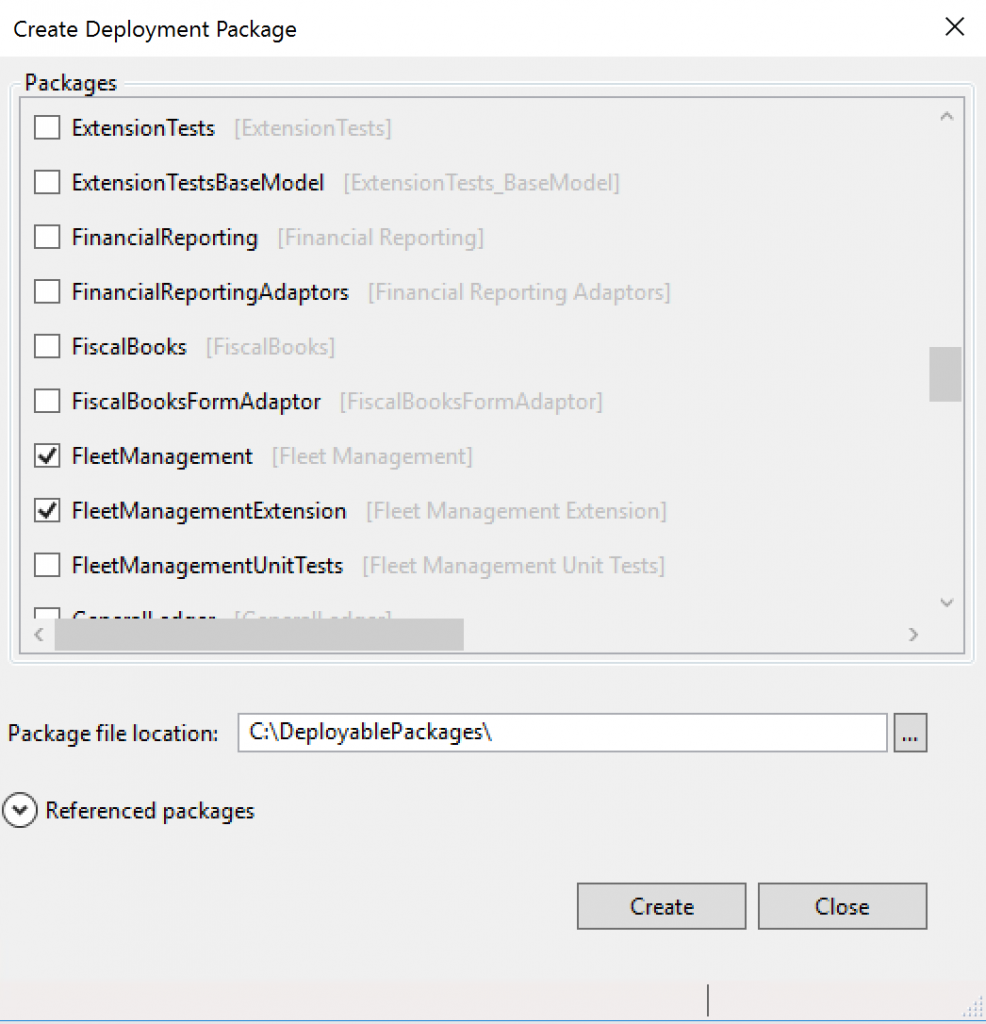
  1. In Microsoft Visual Studio, select Dynamics 365 > Deploy > Create Deployment PackageCreate deployment package
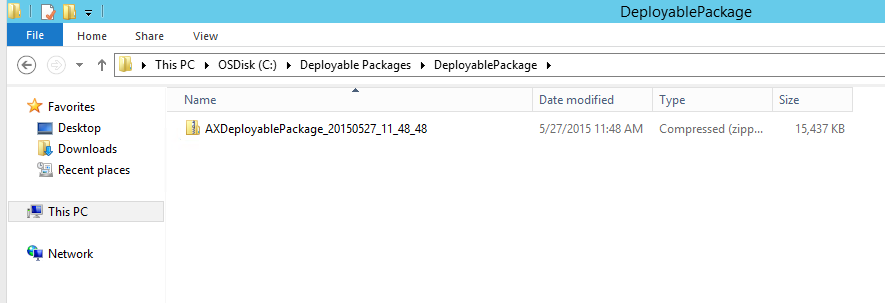
  2. Select the packages that contain your models, and then select a location in which to create the deployable package. Select a location
  3. After a deployable package is created, sign in to Microsoft Dynamics Lifecycle Services (LCS), and then, in your LCS project, click the Asset Library tile.
  4. Upload the deployable package that you created earlier.

Apply a deployable package

Apply updates to a cloud environment :

Note :Applying packages causes system downtime. All relevant services will be stopped, and you won't be able to use your environments while the package is being applied. You should plan accordingly.

Supported environments

The following topologies support package deployment that uses automated flows in LCS:
  • LCS Implementation Project – All environment types are supported. Automated package application is a self-service operation in all environments except production environments. For production environments, customers must use LCS to submit a request to apply packages.
  • LCS Partner and Trial Projects – All environment types are supported, except multi-box dev/test topologies.
For other topologies (below), you must use Remote Desktop Protocol (RDP) to connect to the environment and install from the command line. 

Source:MSDN

How to enable the dimension fields based on the Item selected on the form.

[Form] public class KMTShipFromWarehouses extends FormRun {     InventDimCtrl_Frm_EditDimensions        inventDimFormSetup;     /// ...