Thursday, October 4, 2018

Trade Agreements – How to Set Up Prices

Trade agreements in Dynamics AX 2012 allow for setting up prices and discounts for Products, Vendors, and Customers. (Or groups of Products, Vendors, and Customers). Trade agreements can be set up in a lot of different ways, with varying results.

Trade agreements are managed by setting up price/discount agreement journals.

Navigate to Sales and marketing > Journals, or to Procurement and sourcing > Journals, and select Price/discount agreement journals and select “New”.

We will be creating a price adjustment journal:

Select Price, and tab through the line. We will have a new journal with a number assigned from the number sequence: Next, click on Lines to enter the prices for individual items

There are a number of options to complete when entering adjustment lines. The first is the relation column, which determines the function of the line:

The account code determines whether a price applies to all vendors, a group of vendors, or a single vendor. The choices are “All” for all, “Group” for a group, and, very intuitively, “Table” for a single vendor. J We are assigning a price for a group:


X++ code to get the price for the Item from the Trade agreement using PurchTable buffer :

public static PurchPrice getPriceDiscAmount(VendTable       _vendTable,
                                                ItemId          _aLineItemId,
                                                InventDimId     _aLineInventDimId,
                                                TransDate       _transDate,
                                                PurchQty        _purchQty,
                                                PurchUnit       _purchUnit,
                                                CurrencyCode    _currency)
    {
        PurchTable                      purchTable;
        PurchLine                       purchLine;
        purchTable.clear();
        purchTable.initFromVendTable(_vendTable);
        purchLine.clear();
        purchLine.initFromPurchTable(purchTable);
        purchLine.ItemId        = _aLineItemId;
        purchLine.InventDimId   = _aLineInventDimId;
        purchLine.DeliveryDate  = _transDate;
        purchLine.PurchQty      = _purchQty;
        purchLine.PurchUnit     = _purchUnit;
        purchLine.CurrencyCode  = _currency;
        purchLine.initFromInventTable(InventTable::find(_aLineItemId));
        return purchLine.PurchPrice;
    }

If you want to get the price using standard priceDisc class and priceGroup :

public static Price findPurchPrice(ItemId _itemId, VendAccount _vendAccount, InventDimId _inventDimId, Qty _qty)
   
{
        PriceDisc               priceDisc
;
        InventTable inventTable
= InventTable::find(_itemId);
        VendTable vendTable
= VendTable::find(_vendAccount);
       
//InventDim               inventDimItem       = inventTable.inventItemInventSetup().inventDim();
        InventDim inventDimItem
= InventDim::find(_inventDimId);
        UnitOfMeasureSymbol     unitId             
= inventTable.inventTableModuleInvent().UnitId;
        Price                   retPrice
;

        priceDisc
= new PriceDisc(ModuleInventPurchSales::Purch, _itemId, inventDimItem, unitId, systemDateGet(), _qty , _vendAccount);

       
if (priceDisc.findPrice(_vendTable.PriceGroup))
            retPrice
= priceDisc.price();
       
else if (priceDisc.findItemPrice())
            retPrice
= priceDisc.price();

       
return retPrice;
   

} In AX 2012 you can use the standard method to get the price from the trade agreement.
static void GetPriceFromItemAndVendor(Args _args)
{
    InventTable                 inventTable = inventTable::find('10000');
    InventDim inventDim;
    ItemId ItemId;
    UnitOfMeasureSymbol UnitId;
    TransDate TransDate;
    PriceDisc PriceDisc;
    container result;

    InventDim.initFromInventTable(inventTable);
    
    ItemId = "10000";
    UnitId = "Pcs";
    TransDate = today();

    result = PriceDisc::findItemPriceAgreement(ModuleInventPurchSales::Purch, ItemId, inventDim, UnitId, TransDate, 10000, "1001",
                            "USD", "0");

}


Wednesday, August 8, 2018

OData

What is OData?

OData is a standard protocol for creating and consuming data. 
The purpose of OData is to provide a protocol that is based on Representational State Transfer (REST) for create, read, update, and delete (CRUD) operations. 
OData applies web technologies such as HTTP and JavaScript Object Notation (JSON) to provide access to information from various programs. 

OData provides the following benefits:
  • It lets developers interact with data by using RESTful web services.
  • It provides a simple and uniform way to share data in a discoverable manner.
  • It enables broad integration across products.
  • It enables integration by using the HTTP protocol stack.
The public OData service endpoint enables access to data in a consistent manner across a broad range of clients.

OData services

We provide an OData REST endpoint. This endpoint exposes all the data entities that are marked as IsPublic in the Application Object Tree (AOT). It supports complete CRUD (create, retrieve, update, and delete) functionality that users can use to insert and retrieve data from the system. 

Supported features from the OData specification

The following are the high-level features that are enabled for the OData service, per the OData specification.
  • CRUD support is handled through HTTP verb support for POST, PATCH, PUT, and DELETE.
  • Available query options are
    • $filter
    • $count
    • $orderby
    • $skip
    • $top
    • $expand
    • $select
  • The OData service supports serving driven paging with a maximum page size of 1,000.

Filter details

There are built-in operators for $filter
  • Equals
  • Not equals
  • Greater than
  • Greater than or equal
  • Less than
  • Less than or equal
  • And
  • Or
  • Not
  • Addition
  • Subtraction
  • Multiplication
  • Division
You can also use the Contains option with $filter requests. It has been implemented as a wildcard character. For example: http://host/service/EntitySet?$filter=StringField eq '\*retail\*'

Batch requests

Batch requests are supported in the OData service.

Metadata annotations

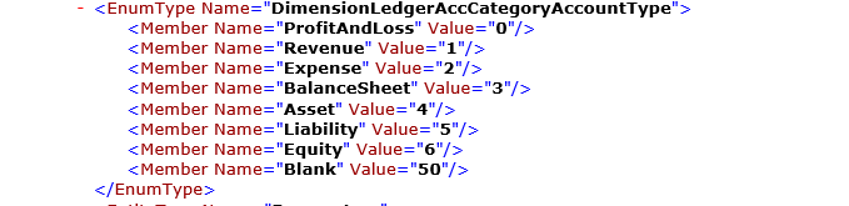
/data/$metadata provides annotations. EnumType is support in $metadata.
EnumType metadata

Cross-company behavior

By default, OData returns only data that belongs to the user's default company. To see data from outside the user's default company, specify the ?cross-company=true query option. This option will return data from all companies that the user has access to.
Example: http://[baseURI\]/data/FleetCustomers?cross-company=true
To filter by a particular company that isn't your default company, use the following syntax: http://[baseURI\]/data/FleetCustomers?$filter=dataAreaId eq 'usrt'&cross-company=true

Validate methods

The following table summarizes the validate methods that the OData stack calls implicitly on the corresponding data entity.
ODataMethods (listed in the order in which they are called)
Create
  1. Clear()
  2. Initvalue()
  3. PropertyInfo.SetValue() for all specified fields in the request
  4. Validatefield()
  5. Defaultrow
  6. Validatewrite()
  7. Write()
Update
  1. Forupdate()
  2. Reread()
  3. Clear()
  4. Initvalue()
  5. PropertyInfo.SetValue() for all specified fields in the request
  6. Validatefield()
  7. Defaultrow()
  8. Validatewrite()
  9. Write()
Delete
  1. Forupdate()
  2. Reread()
  3. checkRestrictedDeleteActions()
  4. Validatedelete()
  5. Delete()

Exposing OData entities

OData entities are based on the concept of an updatable view. When the IsPublic property for an updatable view is set to TRUE, that view is exposed as a top-level OData entity.

Setting navigation properties between OData entities

Links between OData entities are described by a navigation property. Navigation properties describe the navigation from one end of an association to the other end.

Adding actions on OData entities

Actions let you inject behaviors into the data model. To add actions, add a method to the updatable view, and decorate that method with specific attributes. Here is an example.
[SysODataActionAttribute("CalcMaintenanceDuration", true)]
public int CalculateMaintenanceDuration()
{
    //do something
    return 0;
}
In this example, the SysODataActionAttribute class decorates the CalculateMaintenanceDurationmethod that is exposed as an action. The first argument of the attribute is the publicly exposed name of the action, and the second argument indicates whether this action is always available. Methods that are exposed as actions can return any primitive type or another public updatable view. After this method is exposed, it appears in the OData $metadata. Here is an example.
Exposed method in the OData $metadata
The following example of an OData action takes in a parameter and returns a list.
[SysODataActionAttribute("GetColors", true),
 SysODataCollectionAttribute("return", Types::Record, "CarColor")]
public List GetColorsByAvailability(boolean onlyAvailableVehicles)
{
    List returnList = new List(Types::Record);
    // do something
    return returnList;
}
In this example, the SysODataCollectionAttribute class enables OData to expose strongly typed collections from X++. This class takes in three parameters:
  • The name of the parameter that is a list (Use return for the return value of the method.)
  • The X++ type of the members of this list
  • The public name of the OData resource that is contained in the collection
After these actions are exposed, they can be invoked from the service root URL.
You can find actions that are defined on data entities by searching for the SysODataActionAttributeattribute in the source code.

Querying or browsing an OData endpoint

OData enables an SQL-like language that lets you create rich queries against the database, so that the results include only the data items that you want. To create a query, append criteria to the resource path. For example, you can query the Customers entity collection by appending the following query options in your browser.
URLDescription
[Your organization's root URL]/data/CustomersList all the customers.
[Your organization's root URL]/data/Customers?$top=3List the first three records.
[Your organization's root URL]/data/Customers?$select=FirstName,LastNameList all the customers, but show only the first name and last name properties.
[Your organization's root URL]/data/Customers?$format=jsonList all the customers in a JSON format that can be used to interact with JavaScript clients.
The OData protocol supports many similar filtering and querying options on entities. 

Authentication

OData sits on the same authentication stack as the server.

Tips and tricks

Run multiple requests in a single transaction

The OData batch framework uses changesets. Each changeset contains a list of requests that should be treated as single atomic unit. In other words, either all the requests are run successfully or, if any request fails, none of the requests are run successfully. The following example shows how to send a batch request that has a list of requests in a single changeset.
The SaveChangesOptions.BatchWithSingleChangeset option in SaveChanges() helps guarantee that all requests are bundled into a single changeset.
public static void CreateProductColors(Resources context)
    {
        var productColorsCollection = new DataServiceCollection<ProductColor>(context);

        var color1 = new ProductColor();
        productColorsCollection.Add(color);
        color1.ColorId = "New Color1"; // set any other properties needed

        var color2 = new ProductColor();
        productColorsCollection.Add(color1);
        color2.ColorId = "New Color2"; // set any other properties needed

        context.SaveChanges(SaveChangesOptions.BatchWithSingleChangeset);
    }

Prevent unset records from being posted when you use an OData client

When you create a new record by using an OData client, as shown in example 1, properties that aren't set are included in the body of the request, and default values are assigned to them. To prevent this behavior and post only properties that are set explicitly, use the SaveChangesOptions.PostOnlySetProperties option in SaveChanges(), as shown in example 2.
Example 1
public static void CreateVendor(Resources context)
    {
        var vendorCollection = new DataServiceCollection<Vendor>(context);
        var vendor = new Vendor();
        vendorCollection.Add(vendor);
        // set properties
        context.SaveChanges();
    }
Example 2
public static void CreateVendor(Resources context)
    {
        var vendorCollection = new DataServiceCollection<Vendor>(context);
        var vendor = new Vendor();
        vendorCollection.Add(vendor);
        // set properties

        // Save specifying PostOnlySetProperties flag
        context.SaveChanges(SaveChangesOptions.PostOnlySetProperties);
    }

Handling duplicate names between enums and entities in metadata

There are instances where enums and entities share the same name. This name duplication results in OData client code generation errors. To recover from this error, the helper code in gitHub https://github.com/Microsoft/Dynamics-AX-Integration/blob/master/ServiceSamples/ODataConsoleApplication/MetadataDocumentValidator.cscan be used to identify duplicate name instances that must be removed. The generated metadata document can be used for further processing of the Odata logic on the client side.

Monday, August 6, 2018

Role based security in AX

Role based security in AX 

In role-based security, access is not granted to individual users, only to security roles. Users are assigned to roles. A user who is assigned to a security role has access to the set of privileges that is associated with that role. A user who is not assigned to any role has no privileges.
In Microsoft Dynamics AX, role-based security is aligned with the structure of the business. Users are assigned to security roles based on their responsibilities in the organization and their participation in business processes. The administrator grants access to the duties that users in a role perform, not to the program elements that users must use.
Permissions represent access to individual securable objects, such as menu items and tables. 
Privileges are composed of permissions and represent access to tasks, such as canceling payments and processing deposits. 
Duties are composed of privileges and represent parts of a business process, such as maintaining bank transactions. 
Both duties and privileges can be assigned to roles to grant access to Microsoft Dynamics AX.


Security roles

All users must be assigned to at least one security role in order to have access to Microsoft Dynamics AX. The security roles that are assigned to a user determine the duties that the user can perform and the parts of the user interface that the user can view.

Process cycles

A business process is a coordinated set of activities in which one or more participants consume, produce, and use economic resources to achieve organizational goals.
Process cycles are used for organization only. The process cycles themselves cannot be assigned to roles.

Duties

Duties correspond to parts of a business process. The administrator assigns duties to security roles. A duty can be assigned to more than one role.
In the security model for Microsoft Dynamics AX, duties contain privileges. For example, the Maintain bank transactions duty contains the Generate deposit slips and Cancel payments privileges. Although both duties and privileges can be assigned to security roles, we recommend that you use duties to grant access to Microsoft Dynamics AX.

Privileges

In the security model for Microsoft Dynamics AX, a privilege specifies the level of access that is required to perform a job, solve a problem, or complete an assignment. Privileges can be assigned directly to roles. However, for easier maintenance, we recommend that you assign only duties to roles.
A privilege contains permissions to individual application objects, such as user interface elements and tables. For example, the Cancel paymentsprivilege contains permissions to the menu items, fields, and tables that are required to cancel payments.

Permissions

Each function in Microsoft Dynamics AX, such as a form or a service, is accessed through an entry point. Menu items, web content items, and service operations are referred to collectively as entry points.
In the security model for Microsoft Dynamics AX, permissions group the securable objects and access levels that are required to run a function. This includes any tables, fields, forms or server side methods that are accessed through the entry point.
Only developers can create or modify permissions.

How to enable the dimension fields based on the Item selected on the form.

[Form] public class KMTShipFromWarehouses extends FormRun {     InventDimCtrl_Frm_EditDimensions        inventDimFormSetup;     /// ...