Thursday, May 24, 2018

RunBase to SysOperation

A wonderful article written on SysOperation and RunBase by 

From RunBase to SysOperation: Business Operation Framework

There's been a lot of talk about the Business Operation Framework (or SysOperation), how it is the next iteration and future replacement of the RunBase and RunBaseBatch framework. I say "future replacement" since there is plenty of RunBase to go around in the standard application. But we'd all be fools not to take advantage of this new framework in AX. There is a bit of information to be found about this new framework online already. Rather than just a straightforward walkthrough, I will make the comparison between RunBase and SysOperation and you will see making the transition is not that difficult.

The SysOperation framework is basically an implementation of the MVC pattern. The isolation of the parameters (model), the dialog (view) and the code that runs (controller) is the essence of the pattern. If you think about RunBase and these three elements, you will realize how they are intertwined within the RunBase framework:

Model:
• Member variables
• Pack/unpack (aka serialization)

View:
• Dialog()
• GetFromDialog()
• PutToDialog()

Controller:
• Prompt()
• Run()

The framework leverages the services framework for this.
 A service in AX has a data contract, this is basically an AX class with special attributes. The class specifies accessor methods ("parm" methods in AX-speak), again decorated with attributes, which let you set and get member variables. This specifies the data that can go into your process (aka "operation"), and can also specify a return value for it.

The operation itself is just a method that takes a data contract, and returns a data contract. This basically classifies it as a custom service. And indeed, if you use this framework, your operation can in fact be used as a service over AIF. 

You can see the SOA emerge, a hint of where AX is going. Anyway, distractions aside, we now have a model, we have a process, now we need a controller and a view… Easily enough, the view is automatically created based on your data contract (although you can create your own). The controller is simply an inherited class that doesn't even need to do much.
So, what I decided to do is show you a RunBaseBatch class, and then help you convert the class into a SysOperation class. This class lets you input a title and two integer numbers. The run() method will use the title as an infolog prefix, then output the numbers, and the sum of the two numbers. Exciting stuff indeed. So let's dissect this class.

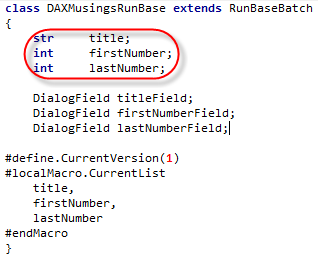
The inputs of this class are the title and the two numbers. My ClassDeclaration of this class looks as follows:


Also note the DialogFields in here (the "View"), and the macros #CurrentList and #CurrentVersion which are used in the pack() and unpack() methods, basically the "serialization" of the input data.

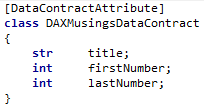
To convert this into a BOF pattern, we will create a Data Contract with our three arguments.


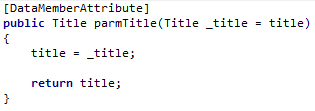
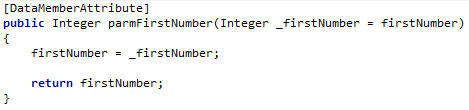
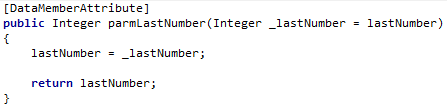
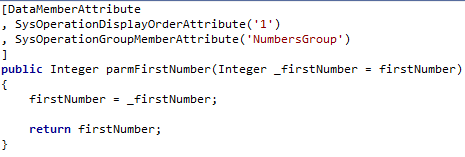
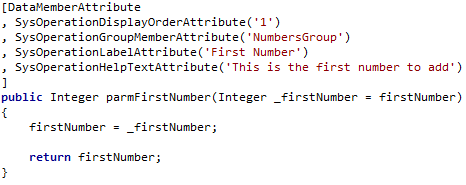
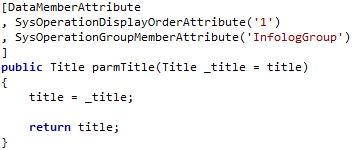
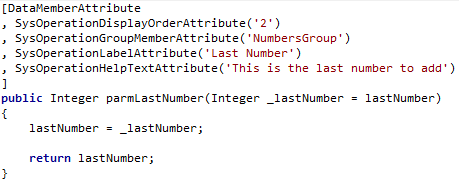
For each member variable (since in AX they are always private), we will create an accessor method. Again here we need to decorate with attributes.


So, we have now created our input Data Contract. Next, we want to create the operation, which is basically the run() method of the RunBase.

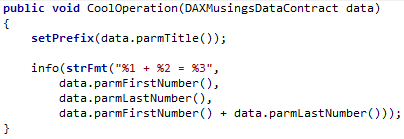
Compared to RunBase, the operation will not have the member variables for our inputs, but rather it will take the data contract as an argument.

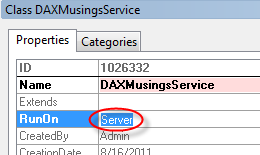
Below shows the original run() method, and the new operation method. We'll also make the operation class RunOn = Server. Other than that, it's a regular class with a method, no special inheritance, interface implementation, or anything.


Ok, so we now have the input Data Contract, we have the operation that takes the data contract and runs the functionality.

 How about the dialog? Well, that will get auto-created by the controller. So, how about that controller? Another class!


Ok, here's where it gets interesting. Technically, we wouldn't even need our own controller class.

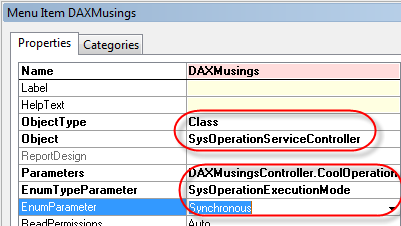
The base controller class which we're extending here (SysOperationServiceController) has some extra logic in its base method, that reads parameters from the Args argument. This will allow you to just create your own menu item (see MSDN article on BOF usage), point it to the class.

 The parameters field needs to be set to your class and method name. In our case it would be DAXMusingsService.CoolOperation (notice the period in between the class and method), the enumtype to SysOperationExecutionMode and then pick your enum value, default is Synchronous (more about this later) - see an example here. So why am I telling you all this when we were creating our own class?
Well, the SysOperationServiceController's constructor (the "New" method in AX) takes the service class name, operation method name and the SysOperationExecutionMode enum as arguments. Since we specifically created our controller class to run the specific operation, we can "hardcode" the class and method name (using best practices of course: pre-compiler methods classStr and methodStr). To accomplish this, let's just create a static construct method. We'll still leave the option of passing in an execution mode so you can do some testing on your own later.


Ok, so we created a handy static construct method. Are we there yet? Yup, pretty much, all we need is a static Main method to execute our controller class.


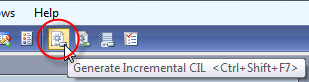
One more thing left to do. Since services, including BOF services, run X++ in the CLR, we need to generate CIL. Rather than doing a full compile (which you should have done when you installed AX!), we can just generate incremental CIL.


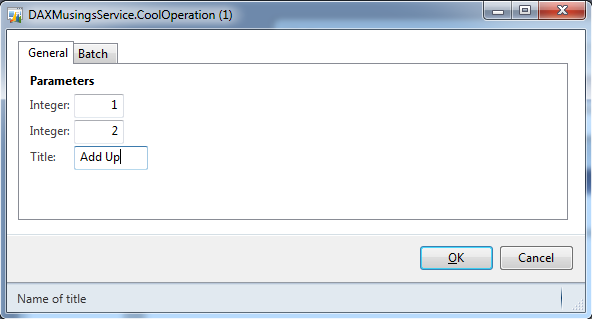
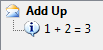
Alright, ready to rock and roll. Run the class!


Cool, that worked! So, no thanks to the length of this article so far, that wasn't bad at all, was it?

Of course, the AX-dialog aficionado in you is already complaining about the auto-generated dialog . For one, in this example the two integers with the same data type have the same label. Secondly, RunBase(Batch) classes need to deal with queries, so how does that work?

Source :  https://daxmusings.codecrib.com/2011/08/from-runbase-to-sysoperation-business.html


We walked through a full example of taking a basic RunBase class and turning into a Business Operation Framework MVC pattern. The example turned out fairly straightforward once you get the concepts down. The two things we were missing though, was the ability to add a query to the Operation, as well as manipulating the auto-generated dialog of the BOF, which is based on the Data Contract and its data member data types. This article builds further on that code, so if you haven't read it yet, please check the previous articlefirst. 

Let's start with the query. Since all inputs that are being passed down to your operation are on the data contract, we can safely assume the query will need to go onto the data contract as well. Now, the data contract has accessor methods for every member you wish to expose, and those members are base AX types (string, int, real, etc). So how will we pass a query? Well, traditionally queries are "packed" (aka serialized) into a container. Containers however are not part of the CLR and so we need a more basic type to serialized our query to. So, BOF basically serializes (encodes) the query to a string. Let's look at the easy way to do first, which is basically all automatic. 

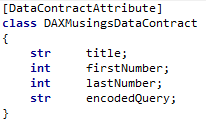
Assuming we have a query in the AOT called "CustBaseData" (this query is available in standard AX for your convenience). All we need to do add that query to our Data Contract is add a variable in the classDeclaration for the encoded query string, and create a data member on the data contract class of type string, and add a special attribute for the query (on top of the datamember attribute we have to add anyway): 


The AifQueryTypeAttribute specifies the name of the argument variable that the encoded query will go into, and you specify what query in the AOT it is based on (CustBaseData in this case). This is already enough to make the query show up on your dialog, as it would with RunBase (a dialog with select button, etc). 
Now of course the question is, how do we retrieve (decode) this encoded query string in our operation "CoolOperation"? Well, basically we're not encoding the query itself necessarily, we're encoding and decoding a container (=packed query). 
For this, AX has two methods available: 

SysOperationHelper::base64Encode() 
SysOperationHelper::base64Decode() 

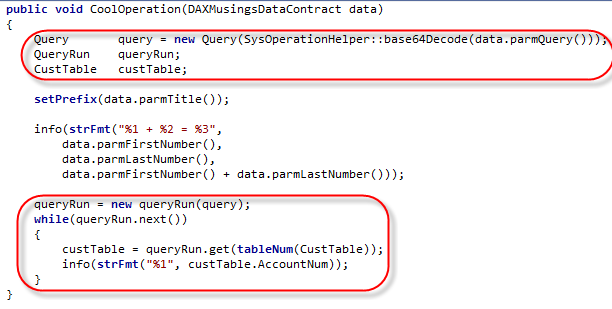
So, to retrieve the packed query, we just need to decode the parmQuery() string of the data contract to a container, then unpack that container to a query... So, let's add some code to our previous CoolOperation method: 


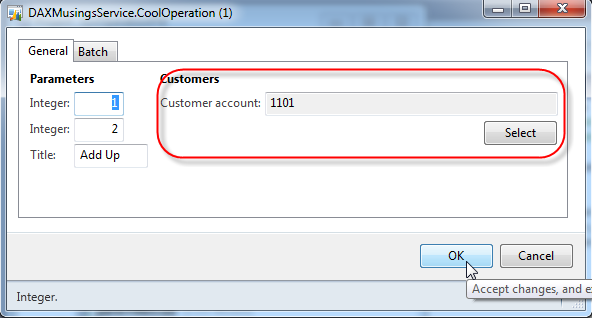
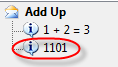
Here we decode the parmQuery() string to container and immediately pass that to the new Query() method to unpack that there. Further down, we create a new QueryRun object base on that query and just iterate the result set and output the customer account number. Before we can run this, we need to run the Incremental CIL Generation! Then, go ahead and try it! To limit the amount of output, I basically clicked the "Select" button and selected the first customer account as a filter. 


Ok, so that worked beautifully! Now you know how to add a query to your Business Operation. So how about customizing the dialog? In a RunBase class, we can add groups to the dialog, and order dialog controls by changing the order of adding of fields to the dialog. This can also be achieved with BOF, by adding some attributes to the data contract. 
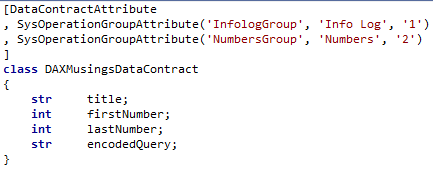
So, the original dialog showed the two integers and then the title. Let's add a group for the numbers, and a group for the title. And let's sort it so the title group is comes before the numbers. All this information is added as metadata on the contract. First, you "declare" the group in the classDeclaration of the data contract: 


The attribute takes a name for the group (control), a label (I used a hard coded string here, but you should use a label such as @SYS9999), and a third parameter specifying the order. Now, for each data member, we can say what group it belongs to, and give it a sorting number within the group: 


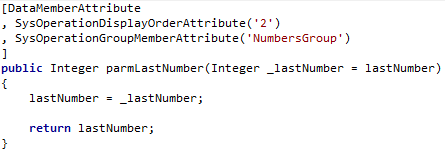
LastNumber 
Title 

The order in which you add the attributes doesn't matter. The query doesn't take a group since it's on the side with the filter fields and the select button (ok, I had to try this to see what would happen... nothing. Adding a group attribute on the query doesn't do anything. You read it here first!). 
Anyway, now we have groups, but our two integer fields are still called "Integer" and "Integer". So how do we set label and helptext like we used to do on RunBase dialog fields? Well, more attributes! (Again, please use labels in real life code!) 


Last Number 

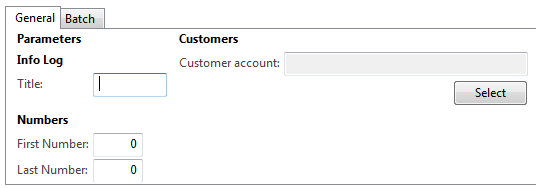
Here's what the dialog now looks like: 


Admittedly, I haven't figured out how to get rid of the "Parameters" top-level group. I'll be debugging this some time to figure out if there's an easy way to get rid of it. So anyway, this is all great. But is there *ANY* way to build a dialog from scratch, like, the old-fashioned way using dialog.addField() or something? 
Well yes ladies and gentlemen, there is. You can create your own "UIBuilder" class by extending the SysOperationUIBuilder class. By default, the SysOperationServiceController class uses the SysOperationAutomaticUIBuilder class, which examines your data contract(s), the attributes used (for groups etc), and builds the dialog from that automatically. But, you can create your own builder. To make the BOF use your UI builder, you guessed it, we can attach the builder to your data contract using... an attribute: 

SysOperationContractProcessingAttribute(classStr(YOURUIBuilderClassName)) 

Unfortunately, again, the post is running a little long, so I'll owe you an example of this some time. Feel free to test out the UI builder class, if you search the AOT for the SysOperationContractProcessingAttribute string in the classes, you will find some examples of this in standard AX. Happy coding!

Monday, May 21, 2018

How to write a generate method to map the default dimension

[DMFTargetTransformationAttribute(true),DMFTargetTransformationDescAttribute("@DMF1365"),
DMFTargetTransformationSequenceAttribute(24)
,DMFTargetTransFieldListAttribute([fieldStr(DMFLedgerJournalEntity,CICDepartments),fieldStr(DMFLedgerJournalEntity,CICProfitCenter),fieldStr

(DMFLedgerJournalEntity,CICDivisions)])
]
public container CICgenerateDimension(boolean _stagingToTarget = true)
{
    container                       res,varContainer;
    Counter                         varCounter=0;
    RecId                           retValueOfDefDimension;


    if (_stagingToTarget)
    {
        varContainer = [0];

        //assigning one dimension
        if(entity.CICDepartments)
        {
            varContainer += ['Department',entity.CICDepartments];
            varCounter++;//increase on ssignmnet of each dimension
        }

        //assigning 2nd dimension
        if(entity.CICProfitCenter)
        {
            varContainer += ['ProfitCenter',entity.CICProfitCenter];
            varCounter++;//increase on assignmnet of each dimension
        }

        if(entity.CICDivisions)
        {
           //assigning 3rd dimension
            varContainer += ['Divisions',entity.CICDivisions];
            varCounter++;//increase on assignmnet of each dimension
        }
        //so on.. you can pass any number of dimensions

        //prepare container
        varContainer = conPoke(varContainer,1,varCounter);

        //pass continer and get back value generated
        retValueOfDefDimension = AxdDimensionUtil::getDimensionAttributeValueSetId(varContainer);

        //Return the default dimension
        if(retValueOfDefDimension)
            res=[retValueOfDefDimension];         

    }
    return res;
}


-----------------------------------------------------------------------------------------------------------------
//assign the return value to the target table field in getReturnFields method


        case methodStr(DMFLedgerBalanceEntityClass, CICgenerateDimension) :
        con += [fieldstrToTargetXML(fieldStr(LedgerJournalTrans, DefaultDimension))];
        break;

How to generate the default dimension with the combination of dimension values using X++

Method 1 :-
static void DefaultDimension(Args _args)
{
DimensionAttributeValueSetStorage valueSetStorage = new DimensionAttributeValueSetStorage();
DimensionDefault result;

int i;
DimensionAttribute dimensionAttribute;
DimensionAttributeValue dimensionAttributeValue;
container conAttr = ['Department','ProfitCenter' ,'Divisions'];
container conValue = ['CE', 'HO', 'GL'];
str dimValue;

for (i = 1; i <= conLen(conAttr); i++)
{
dimensionAttribute = dimensionAttribute::findByName(conPeek(conAttr,i));

if (dimensionAttribute.RecId == 0)
{
continue;
}

dimValue = conPeek(conValue,i);

if (dimValue != "")
{
// The last parameter is "true". A dimensionAttributeValue record will be created if not found.
dimensionAttributeValue =
dimensionAttributeValue::findByDimensionAttributeAndValue(dimensionAttribute,dimValue,false,true);

// Add the dimensionAttibuteValue to the default dimension
valueSetStorage.addItem(dimensionAttributeValue);
info("%1",dimensionAttributeValue);
}
}

result = valueSetStorage.save();
info("%1",result);
}
--------------------------------------------------------------------------------------------------------------------------

Method 2

 static void DefaultDimension(Args _args)
 {

    container   varContainer;
    Counter     varCounter=0;
    RecId       retValueOfDefDimension;
    ;
    
    varContainer = [0];
    
    //assigning one dimension
    varContainer += ["Department","025"];
    varCounter++;//increase on assignmnet of each dimension
    
    //assigning 2nd dimension
    varContainer += ["CostCenter","010"];
    varCounter++;//increase on assignmnet of each dimension
    
    //so on.. you can pass any number of dimensions
    
    //prepare container
    varContainer = conPoke(varContainer,1,varCounter);
    
    //pass continer and get back value generated
    retValueOfDefDimension = AxdDimensionUtil::getDimensionAttributeValueSetId(varContainer);
    
    //display just for demo puprose. in real practice simply assign it to table field(s)
    if(retValueOfDefDimension)
        info(strFmt('You can verify record with RecId %1 in Table DimensionAttributeValueSetItem by filtering on field DimensionAttributeValueSet.',retValueOfDefDimension));    
}

Friday, April 27, 2018

Cloud or on-premise? A Dynamics 365 deployment FAQ

Deciding on a new business software can be an arduous journey.

If you’ve landed on Dynamics 365 as the best option for your organization, you’ve come a long way already, but you’ve still got a major decision left to make; how to deploy it.

Dynamics 365 users have a number of choices when it comes to hosting their new solution. Initially intended to be cloud-only, Microsoft backtracked when it realized that demand for a locally hosted software was still high, and the suite is now offered via multiple means of deployment.

How you choose to host your Dynamics 365 solution can significantly impact your business, dictating factors such as the features and services that are available to you, how and when you can access your software, and who is responsible for keeping your data safe.

Over 80% of the customers who have implemented Dynamics 365 since its launch in late 2016 have opted to deploy via the cloud, but that’s by no means the only path available.

Here, we’ll take a closer look at the different ways you can host your new business software system, the benefits and shortcomings of each option, and address some of the most common questions about Dynamics 365 deployment. We’ve also summed up the advantages and drawbacks of each option in a handy infographic.

If you’re still not sure which option is your best bed after looking at all the pros and cons, you can take our quick deployment quiz to help point you in the right direction.

What are my options?
No matter which apps you choose, whether you license them individually or as part of a plan, or how many users you have, if you decide to use Dynamics 365, you’ll have three options when it comes to how you host and access your software.

Dynamics 365 in the cloud
Option number one, and the most popular choice for Dynamics 365 users, is deploying in the cloud. Cloud-based instances of Dynamics 365 are hosted on Azure, Microsoft’s web services platform, which allows programs and services to be built, tested, deployed, and managed from a network of managed data centers located across the globe.

Hosting your software in the cloud essentially means that everything, from the program itself to your data, is stored online. Using the cloud means that you don’t physically own the software you’re using, and it’s not run from your own computer.

Rather than purchasing a copy of the software and installing it on individual devices, you access it through the internet, in the same way that you’d log in to an email service provider website, like Hotmail or Gmail, to access your inbox, and draft and send messages. With a cloud-based instance of Dynamics 365, the software “lives” on Microsoft’s servers, so all you need to use it is an internet connection and a web browser.

As the software is hosted on its own servers, Microsoft is primarily responsible for maintaining all of your software infrastructure from their end. This includes managing security measures, issuing updates, and performing data backups.

Dynamics 365 on-premise
Referred to as Local Business Data by Microsoft, on-premise is the “traditional” way to deploy software. This option allows users to host their Dynamics 365 software either on their own servers, or those of an IT partner.

Hosting on-premise means businesses keep all their data in-house; all communication with the cloud is switched off, and users are solely responsible for all upkeep and maintenance of the software.

Dynamics 365 hybrid deployment
Also known as Cloud and Edge, hybrid Dynamics 365 deployments are a little from column A, and a little from column B.

Though fully integrated with the Microsoft cloud, transactions and data are stored locally on the users’ own data center. This means users gain access to cloud-based services such as machine learning, business intelligence, and development sandboxes, but their data remains separate.


What are the benefits of Dynamics 365 in the cloud?
Using a cloud-hosted instance of Dynamics 365 opens a lot of doors to new features and services

No infrastructure to maintain

Hosting your Dynamics 365 software in the cloud means you don’t need to spend time and money managing your in-house servers and hardware. All you need to access your solution is an internet connection; there’s nothing to install on individual machines.

With cloud deployment, you don’t need to worry about hardware issues, or data loss or corruption, as the infrastructure supporting your software is all hosted off-site in a secure location.

Business intelligence and machine learning

Users who employ the SaaS model of Dynamics 365 can access expansive and continually evolving business intelligence tools. The cloud not only stores and processes your data, but it also learns from it. Microsoft has invested enormously in machine learning in recent years, and cloud users are beginning to reap the benefits.

Dynamics 365 offers a real-time, 360-degree view of performance, and can help visualize business data using intuitive, customizable reports and dashboards.

By connecting to the brainpower of the cloud, Dynamics 365 customers can engage with a wide range of intelligence tools, including PowerBI, Microsoft’s robust reporting and analytical platform, as well as data-driven next step guidance and digital assistant services.

High availability and disaster recovery

With a financially backed, 99.9% uptime guarantee, you can also be safe in the knowledge that Microsoft have you covered should any kind of disaster recovery be necessary.

In the event your services are interrupted, Dynamics 365 includes some of the most robust disaster recovery features on the business application market. Built to help organizations bounce back from both planned and unexpected service outages, Microsoft’s recovery protocols include keeping a synchronized, duplicate copy of a company’s data on a second server, allowing users to continue their operations with minimal disruption.

This recovery procedure is executed either through network load balancing, which evenly channels traffic through multiple servers, and redistributes the load should a server be compromised. Backup servers can also be employed to ensure operations continue should the primary server fail. Dynamics 365 offers SQL mirroring, in which a copy of your database is hosted on an alternative server that can be brought online in the event of a disaster.

Data backups

Backing up data should be second nature to all businesses, but it’s one of those tasks that often gets pushed down the agenda. Cloud deployment gives users peace of mind by not only removing the need to safeguard their own servers, but also automatically backing up data, so no information will ever slip through the cracks.

Tight integration with other cloud products

The cloud’s interconnected nature allows Dynamics 365 to work closely with other cloud-based products, particularly those within Microsoft’s productivity suite.

Not only does Dynamics 365 in the cloud integrate seamlessly with PowerBI, as we mentioned earlier, but it also cooperates with other popular services such as Office 365, SharePoint, and Outlook.

Being able to connect your Word, Excel, and email data to Dynamics 365 helps build a fuller picture of your business, and increases productivity by breaking down barriers between the programs you use every day.

Dynamics 365’s tight integration means you can track emails, view contact information and history, and create new records directly from Outlook, edit Excel and Word files in the Dynamics interface, and use OneNote to take meeting notes and attach them to Dynamics records.

Access to add-ons through AppSource

If you need to integrate your Dynamics 365 system with any other programs or service you use, or want to find a way to add extra functionality not native to the solution, there’s AppSource.

AppSource is Microsoft’s online store for third-party bolt-ons and integrations. Microsoft cloud service users can visit AppSource to purchase apps that help their software do more. If you want to connect MailChimp to Dynamics 365, add maps, enable speech-to-text functions, there’s an app for that. There are currently over 500 apps and add-ons available to Dynamics 365 users, with more added every day.

These apps can be added to Dynamics 365 in an instant, with no coding or customization necessary. With AppSource, Dynamics 365 cloud users have almost limitless opportunity to modify and extend the functionality of their solution, without having to involve developers or ISVs.

Fast implementation

Like all SaaS platforms, with Dynamics 365 in the cloud, you’re consuming a service rather than installing a product. Without the need to install the software on individual machines, configuring and deploying Dynamics 365 in the cloud is much faster than a traditional implementation.

The solution utilizes point-and-click setup wizards so that users can get up and running quickly. Of course, the more businesses want to modify the service, and the further away from the turnkey, “out of the cloud” iteration they move, the more complicated implementation will become. However, deploying in the cloud is still considerably simpler than rolling out software on-premise.

Scalability

Cloud users can scale the size and scope of their Dynamics 365 solution up or down at any time. With on-premise software, facilitating business growth often means investment in new servers and processors to cope with increased demand.

With cloud-based software, customers are paying for the ability to use the software, and not the computing power or space to run it, so adding or removing users, or even apps, is as simple as issuing a service request.

Dynamics 365 is as large or as small as you need it to be, and will flex to your current situation and requirements.

Always up to date

Users of Dynamics 365 in the cloud receive updates sooner, and more often, than on-premise users; in fact, many features and updates included in the cloud version are never extended to on-premise.

Platform updates are issued every three months, with application updates every six. Cloud users have the choice of whether or not to accept these updates, and can test them in their development sandbox instance to ensure compatibility before implementing them.

This little-and-often approach means users are always at the forefront of any new developments with the software, and negates the need for time-consuming installations of new product versions.

Futureproofing

For the past few years, Microsoft’s motto has been “cloud first, mobile first” and that’s unlikely to change anytime soon. When it comes to business applications, Microsoft’s focus is most definitely on Dynamics 365 in the cloud.

By getting on board with Dynamics 365 online, users put themselves in position to utilize the cutting-edge developments being worked on by the Dynamics 365 team. Cloud users will be at the front of the line when it comes to getting more from their CRM and ERP solutions, putting them at a competitive advantage in their markets.

What are the drawbacks of Dynamics 365 in the cloud?
While there are a huge number of advantages to deploying Dynamics 365 in the cloud, no two businesses are the same, and what works for one will not necessarily work for another. Deployment in the cloud may not be an ideal option for all businesses; here are a few things to take into account when mulling over your deployment options:

Internet-reliant

With your software hosted off-site on someone else’s servers, you’re reliant on having a fast and dependable internet connection to access it. The quality of your internet connection can be dependent on many factors, from the plan and service provider to your geographic location. If you’re thinking about using Dynamics 365 in the cloud, make sure you’re connection can support it.

Data regulation restrictions

Due to regional data regulations, storing critical business and customer data in the cloud may not be viable to some companies. Though Dynamics 365 features many tools to help users meet local compliance standards, for businesses in individual countries or industries, public cloud deployment might not be an option at this time.

Storage costs

Though cloud storage is arguably more cost-effective than shelling out for new hardware when you need more space for your data, there are additional costs to consider when it comes to storage. If you’re storing your data in the cloud, you’re essentially renting space on your cloud service provider’s server. If you need additional room, you’ll need to pay for it.


What are the benefits of using Dynamics 365 on-premise?
For all advantages that come with Dynamics 365 in the cloud, some businesses may still prefer to implement on-premise.

It could be that they don’t feel that they’re ready to make a move to the cloud, or that they’ve recently invested in new hardware. Perhaps, due to the nature of their business or local data regulation, they’re not able to host their data off-site. Or maybe they just don’t have access to a stable enough internet connection to be able to utilize cloud services.

Here are a few things to take into account when mulling over your deployment options:

Use of own infrastructure

Some businesses that have already invested significantly in their infrastructure and hardware will be able to utilize these investments to run their software, rather than rendering them obsolete by using SaaS platforms.

Untethered by internet service

On-premise implementation means that businesses aren’t dependant on a reliable internet connection to be able to use their software. There are many places in the world where organizations do not have access to stable internet services, and deploying offline reassures users that they’ll still be able to access their solution should they experience connectivity issues.

Complete ownership of data

With data stored on-site, businesses have full control over how and where they store their data.

Full control over updates

Although Dynamics 365 cloud users can choose whether or not to implement product updates, certain updates will be mandatory, and users must implement them whether they want them or not. With an on-premise solution, users have greater control over whether, and when, to apply upgrades.

No data storage costs

Housing your data locally means you won’t incur increasing storage costs as your business and its database grows. However, this factor could be a double-edged sword for firms that do not already have the hardware in place to facilitate future expansion, as they will have to purchase new servers.

What are the drawbacks of using Dynamics 365 on-premise?
No access to cloud-based services and features

Certain features and services available with Dynamics 365 use the public cloud to function, and therefore are not available to on-premise users. Features that Dynamics 365 on-premise users miss out on include:

Machine learning and AI

Machine learning services help you spot patterns and predict trends by analyzing your data at a speed and depth that would be impossible for human users. By getting to grips with your business information and processes, Dynamics 365’s Azure-powered machine learning tools can offer suggestions and actionable next steps, helping you stay ahead of the curve.

Machine learning is being implemented more and more by businesses of all sizes, so organizations not utilizing AI in their processes are likely to fall behind sooner or later.

PowerBI

Without integration with Microsoft’s cloud services, on-premise users are not able to access business intelligence services such as PowerBI. Although Dynamics 365 does have native reporting services, users cannot utilize PowerBI’s robust and perceptive analytical tools.

Flow and PowerApps

Other cloud-integrated services that on-premise users miss out on include PowerApps, a drag-and-drop app builder which Citizen Developers can use to create mobile solutions, and Flow, a workflow creator that integrates apps and services with Dynamics 365 to automate repetitive tasks.

Web portals

Dynamics 365 in the cloud natively includes the ability to build and manage self-service web portals. These portals, which can be made available to customers, partners, or employees for a wide range of purposes, are not included in the cost of Dynamics 365 on-premise, and must be purchased separately.

Learning Paths

Cloud users can build guided learning paths, to help users navigate the Dynamics 365 system. These routes can be customized depending on the role of the user, and can massively boost user adoption and productivity. Learning paths are not available to offline users.

Voice of the Customer surveys

This integrated survey platform allows users to create and distribute questionnaires to customers, collect and analyze customer opinions and ratings, and helps businesses offer better service. Voice of the Customer surveys is not available on-premise.

Gamification

Dynamics 365’s gamification service allows organizations to set up fantasy sport-style games and competitions, analyze performance, and reward individuals and teams based on pre-defined KPIs. Gamification can help increase engagement, encourage solution adoption, and motivate employees to be more productive.

No access to data support

Running Dynamics 365 on internal servers means that the customer is exclusively responsible for its upkeep, and must have their own security, backup, and disaster recovery procedures in place to protect their data and operations.

Back of the line for new developments

Due to the frequent updates made to Dynamics 365 in the cloud, online users will always receive the latest features, fixes, and updates long before they are applied to on-premise versions, if they are made available offline at all.

Investing in outdated technology

Microsoft has made it clear that the future of their business applications is in the cloud. If users want to be able to keep up with developments and remain competitive, a move to the cloud is inevitable. Implementing Dynamics 365 on-premise ultimately puts organizations at a disadvantage when it comes to the tools they can access, and the services they can offer their customers.

The upside to this, however, is that Microsoft has processes in place to make migrating to the cloud fast and straightforward when customers are ready to make the switch.


What are the benefits of using Dynamics 365 hybrid deployment?
If neither online or offline deployment ticks all the boxes, businesses can consider hybrid deployment, which in theory encompasses the advantages of both cloud and on-premise implementation.

Cloud services included

Cloud and Edge deployment isn’t exactly a 50/50 split between online and offline implementation, and is run mainly from the cloud. This means that hybrid users can enjoy all of the benefits and services offered by Dynamics 365 cloud deployment.

Locally stored data

With Cloud and Edge, transactions are supported by local application services, and business data is hosted in-house, with the option to sync it to the cloud. For this reason, Cloud and Edge deployment is an option for those businesses who need to have full, localized their business data for compliance purposes, but still want to be able to utilize all that the cloud provides.

Business continuity

The ability to use the system offline can be useful to industries in which business continuity is especially important, such as retail or manufacturing. Cloud and Edge deployment allows customers to run their Point of Sale operations regardless of connectivity, so that users can capture data and perform transactions whatever their internet status. Any data obtained offline can later be synced to the cloud for business intelligence or reporting purposes at a later date.

Shared data trusteeship

In the hybrid deployment scenario, both Microsoft and the customer are responsible for safeguarding Dynamics 365 data, meaning users can take advantage of the strong security and disaster recovery services on offer to cloud users.

What are the drawbacks of using Dynamics 365 hybrid deployment?
Both Microsoft and the customer being joint-data trustees can be a hindrance as well as a help. With cloud data syncing left to the user’s discretion, any data hosted locally on internal servers, and not backed up, can be vulnerable to loss or corruption.


If I deploy in the cloud, can I still customize Dynamics 365?
You can still customize a cloud-based version of Dynamics 365. Many aspects of the interface can be tailored to specific user needs, including forms, fields, views, dashboards, and processes, as well as colors and branding.

In addition to being able to expand and modify functionality with add-ons and extensions, users can also create their own tailored apps and workflows with PowerApps and Microsoft Flow.

How does storage work with cloud deployment?
With cloud deployment, no data is stored on your local business hardware; all your business information is housed on off-site servers. If you’re deploying entirely in the cloud, then your data will be stored either in one of Microsoft’s data centers, or if you opt to use a private cloud,  on the servers of your chosen Microsoft partner.

Though ostensibly cheaper than purchasing and maintaining your own servers, hosting your data in the cloud isn’t free. You’re effectively hiring out someone else’s server, and naturally, cloud service providers will charge you for the privilege.

Luckily for Dynamics 365 users, Microsoft’s cloud storage allowances are some of the most generous of all the major CSPs. Each Dynamics 365 license includes 10GB of cloud storage, with an additional 5GB added for every 20 licenses purchased. For example, if you bought 80 licenses, you’d have 820GB (800GB + an extra 20GB) of storage at your disposal. There is no cap on the amount of additional per-user storage.

If you find yourself outgrowing your storage quota, you can acquire extra space at a cost of $50 per month for every additional 10GB.

Where will my cloud data be stored?
Microsoft owns and operates data centers around the world. Users can use an interactive map to determine where their data will be stored depending on which services they’re using, and where their business is located.

For example, a business based in the United States using Dynamics 365 for Project Service Automation would have their data stored in either Microsoft’s San Jose, CA, or Boydton, VA data centers.

Dynamics 365 users in Europe will have their data stored in data centers in Ireland, and the Netherlands. Microsoft’s data centers are regulated by EU data protection law.

If it becomes necessary for Microsoft to expand or relocate data outside of your geographical region, system administrators will be notified one month in advance of the move.

Will my data be safe in the cloud?
There are still a lot of common misconceptions surrounding cloud security, but the reality is that your data is almost certainly safer in the hands of a leading tech company, which invests over $1 billion every year in security and privacy measures, than on your own servers.

Dynamics 365 employs multiple security features to ensure the safety of your business data. All connections made between users and data centers are encrypted. Public endpoints are secured with Transport Layer Security.

Any unauthorized traffic attempting to access Dynamics 365 is blocked at the data centers, which are tested, validated, and updated continuously to ensure there are no cracks through which suspicious users can access your software. Microsoft’s high-end anti-malware software detects and protects against cyber threats or intrusions.

At the users’ side, role-based security is in place to manage access and activity within the software, with users granted only permissions that are necessary for their particular job role. This guarantees that users are not able to access any data or processes that the administration has not deemed essential to carrying out their duties, and restricts the viewing of critical business data to those with the appropriate clearance.

Will I still have control over my Dynamics 365 data in the cloud?
No matter where your data is stored, you remain the sole owner of your data. If you choose to deploy in the cloud, Microsoft will be the data trustee, tasked with safeguarding your information, but that data is still yours.

Microsoft does not mine your data or use it for anything other maintaining and providing your Dynamics 365 service. If you choose to terminate your Dynamics 365 subscription, you can take your data with you. Legacy data is available for 90 days after a subscription is canceled. During that time, users can either download their data to their own servers, or transfer it to a new cloud service provider.

During that time, users can either download their data to their own servers, or transfer it to a new cloud service provider. Dynamics 365 automatically backs up your data on a daily basis. These backups are kept for three days, unless you choose to save them. You can also request a physical backup of your Dynamics 365 data from Microsoft if you require it.

Which browsers can I use to access Dynamics 365?
Dynamics 365’s native HTML5 browser-based user interface can run on any device, including PCs, tablets, and phones, and on both Windows and Mac.

The platform supports a number of the most popular browsers. Including Internet Explorer, Edge, Chrome, Safari, and Firefox. It should be noted however that full copy and paste functions are not yet supported in Firefox and Chrome.

For an improved user experience when accessing the system on mobile or tablet, Dynamics 365 apps are available for iPad and Windows 8.

What are the hardware requirements for implementing Dynamics 365 on-premise?
Microsoft recommends that your hardware meets the following requirements to run Dynamics 365 on-premise efficiently:

Processor — x64 architecture or compatible dual-core 1.5 GHz processor minimum. Quad-core x64 architecture 2 GHz CPU or higher such as AMD Opteron or Intel Xeon systems recommended.

Memory — 4-GB RAM minimum, 8-GB RAM or more recommended.

Hard disk — 10 GB of available hard disk space minimum, 40 GB or more of available hard disk space recommended.

Is Dynamics 365 on-premise pricing different to cloud pricing?
The licensing model for Dynamics 365 is designed to give users as much flexibility and value for money as possible. To that end, there are a number of ways to license the product, depending on the needs of your organization.

The most cost-effective option is to purchase one of the three available plans, which bundle apps together to give users access to a range of functionality at a discounted rate.

For those looking for a full business software package, including both ERP and CRM apps, there’s the Dynamics 365 Plan, which features all the applications the suite has to offer.

The Unified Operations Plan features only the ERP-aligned modules, and the Customer Engagement Plan gets you just the CRM apps.

Users can also build their own plans by purchasing apps separately. It should be noted, however, that Dynamics 365 for Finance and Operations, the suite’s flagship ERP app, is not available to license as a standalone module, and must be obtained as part of a plan.

Plan Price Modules included
Dynamics 365 Plan Full user — $210 /user/month


PlanPriceModules included
Dynamics 365 PlanFull user — $210 /user/month

Additional Users:
  • Team Members — $8 /user/month
  • Operations Activity — $50 /user/month
  • Operations Devices — $75 /device/month
Finance and Operations
Retail
Talent
Sales
Customer Service
Project Service Automation
Field Service
Social Engagement
Relationship Sales  
PowerApps
Unified Operations PlanFull user from $190 /user/month

Additional Users:
  • Team Members — $8 Per user/month
  • Operations Activity — $50 Per user/month
  • Operations Devices — $75 Per device/month
Finance and Operations
Retail
Talent
PowerApps
Customer Engagement PlanFull user — $115 /user/month

Additional Users:
  • Team Members — $8 /user/month
Sales
Customer Service
Project Service Automation
Field Service
Social Engagement
Relationship Sales
PowerApps


This pricing applies to both cloud, on-premise, and hybrid deployments, but for businesses wishing to deploy Dynamics 365 on-premise, there are additional costs to consider.

To run Dynamics 365 from their own data centers, on-premise users will also need to purchase a license for each of their servers.

Customers wanting to deploy on-premise through the Local Business Data option have a second choice when it comes to licensing. As well as having the standard monthly subscription model available, offline users can also purchase the solution through a Software Assurance plan.

Microsoft’s Software Assurance program is a volume licensing scheme that enables Dynamics 365 users to take advantage of additional benefits, training, and support, as well as giving them the right to upgrade their software at no additional cost when new versions become available.

Whichever route you decide to take, implementing Dynamics 365 without the right skills in your corner can be almost impossible. Browse our bank of pre-screened, qualified Dynamics 365 professionals for free today, and find the experience you need to make your deployment a success.

Source :- https://www.nigelfrank.com/en/microsoft-dynamics-blog/cloud-or-on-premise-a-dynamics-365-deployment-faq/

Friday, March 16, 2018

Best Practice Error : The Table.Field does not have a corresponding parm-method on the AxBC-class

If you add new field in a table and getting "The Table.Field does not have a corresponding parm-method on the AxBC-class" error message, you can run following Job to fix this issue. 

This job will add corresponding parm-method for newly added field in a table.

static void CreateAxBCParmMethodJob(Args _args)

    axGenerateAxBCClass axGenerateAxBCClass; 

    axGenerateAxBCClass = AxGenerateAxBCClass::newTableId(tablenum(CustTable));
    axGenerateAxBCClass.run(); 

}

Thursday, March 15, 2018

How to read the value from Unbound(Checkbox) control in D365

/// <summary>
///
/// </summary>
/// <param name="sender"></param>
/// <param name="e"></param>

[FormControlEventHandler(formControlStr(VendTable, DIPL_VendorBlocking), FormControlEventType::Modified)]

public static void DIPL_VendorBlocking(FormControl sender, FormControlEventArgs e)
{
        FormCheckBoxControl  callerButton = sender as FormCheckBoxControl ;  //Retrieves the button that we're reacting to
        FormRun element = callerButton.formRun();

        if(callerButton.checked())
        {
             VendTable vendTable = sender.formRun.datasource(1).cursor(); // this will read the current record from the table.
             vendTable.Blocked   = custVendorBlocked::ALL; // updating table field.
         
        }
}

Helpfull reference :
https://shyamkannadasan.blogspot.in/2017/04/form-control-event-handler-methods-in.html
https://community.dynamics.com/ax/b/365operationswithsukrut/archive/2018/01/15/customizing-d365-with-event-handlers

Friday, March 9, 2018

Dynamics 365 for Finance and Operations

Application stack :


The application stack and server architecture aligns with three key pillars :
  • New client
  • Cloud readiness
  • New development stack


The application stack has been divided into three separate models: 
Application Platform,
Application Foundation, 
and Application Suite.


The separation enables new application development on the base foundation models, just as the Fleet Management sample application has been developed.


 Note the following important points about the changes in the server architecture:

  • The services endpoint on the server is now responsible for returning all form and control metadata and data to the browser-based client. There is no longer any remote procedure call (RPC)-based communication with the server. The form objects still run on the server, and rendering has been optimized for browsers and other clients through server and client-side (browser) investments.
  • The server, including the application code base, is deployed to an Internet Information Services (IIS) web application. In the cloud, it's deployed to Microsoft Azure infrastructure as a service (IaaS) virtual machines (VMs).
  • It is hosted on Azure and is available for access through the Internet. A user can use a combination of clients and credentials to access it. The recommended primary identity provider is OrgID, and the store for the identity is Azure Active Directory (Azure AD). The security subsystem uses the same AuthZ semantics for users and roles.
  • Two types of clients must be considered for access in the cloud: active clients and passive clients.
    • Active clients can programmatically initiate actions based on responses from the server. An active client doesn't rely on HTTP redirects for authentication. A smart/rich client is an example of an active client.
    • Passive clients can't programmatically initiate actions based on responses from the server. A passive client relies on HTTP redirects for authentication. A web browser is an example of a passive client.
    Currently, Access Control Service (ACS) doesn't support a mechanism for non-interactive authentication. Therefore, even when active clients try to authenticate by using ACS, they must use passive client authentication, in which a browser dialog box prompts the user to enter his or her credentials.
  • A completely revamped metadata subsystem incorporates the new compiler and Microsoft Visual Studio–based development model. The model store is represented as a set of folders and XML artifacts that are organized by model. The model elements, such as tables, forms, and classes, are represented by an XML file that contains both metadata and source code.

Cloud architecture 

The cloud architecture includes services that automate software deployment and provisioning, operational monitoring and reporting, and seamless application lifecycle management. The cloud architecture consists of three main conceptual areas:
  • Lifecycle Services (LCS) – LCS is a multi-tenant shared service that enables a wide range of lifecycle-related capabilities. Capabilities that are specific to this release include software development, customer provisioning, service level agreement (SLA) monitoring, and reporting capabilities.
  • Finance and Operations – The VM instances are deployed through LCS to your Azure subscription. Various topologies are available: demo, development/test, and high-availability production topologies.
  • Shared Microsoft services – Finance and Operations uses several Microsoft services to enable a “One Microsoft” solution where customers can manage a single sign-in, subscription management, and billing relationship with Microsoft across Finance and Operations, Microsoft Office 365, and other online services.
Many features of the Azure platform are used, such as Microsoft Azure Storage, networking, monitoring, and SQL Azure, to name a few. Shared services put into operation and orchestrate the application lifecycle of the environments for participants. Together, Azure functionality and LCS will offer a robust cloud service.


Development environment

The architecture of the development environment resembles the architecture of the cloud instance. It also includes the software development kit (SDK), which consists of the Visual Studio development tools and other components. Source control through Team Foundation Server or Visual Studio Online enables multiple-developer scenarios, where each developer uses a separate development environment. Deployment packages can be compiled and generated on a development environment and deployed to cloud instances by using LCS. The following diagram shows how the key components interact in a development environment.

CloudEnvironmentTechConcepts


Development system requirements


Development environments can be hosted locally or in Microsoft Azure. The build process, X++ compilation and generation of cross reference information, will typically run satisfactorily on machines with 16 GB of memory and 2 CPU cores. However, the compiler will use available resources, so more RAM and more cores may translate into faster compilations, especially if there is contention for the resources from other processes running concurrently. In such cases, we recommend 24 GB of memory with 4 cores. At a minimum, 2 CPU cores are recommended because the developer environment contains many components that may be running concurrently, including the AOS web application, Visual Studio, Management Reporter, and SQL Server.

How to enable the dimension fields based on the Item selected on the form.

[Form] public class KMTShipFromWarehouses extends FormRun {     InventDimCtrl_Frm_EditDimensions        inventDimFormSetup;     /// ...